
// JavaProject InputDialog
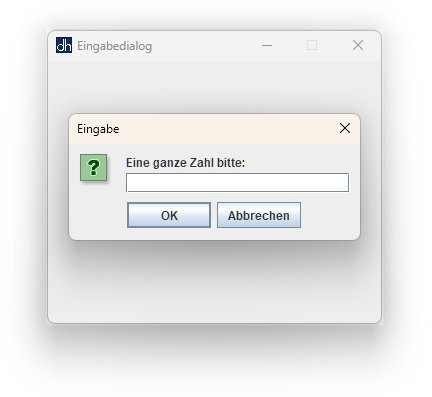
Zwei Eingabedialoge verlangen bestimmte Benutzereingaben. Passt
eine Eingabe nach dem Klick auf den OK-Button nicht zur
gestellten Frage, so wird die Eingabe mit einer Fehlermeldung quittiert und
der Eingabedialog wird wiederholt.
Die Dialogfenster werden erzeugt durch Aufruf der statischen Methoden showInputDialog bzw. showMessageDialog der Klasse JOptionPane. Die Methode showQuestionDialog liefert die jeweilige Benutzereingabe als Zeichenkette zurück. Der Inhalt der Zeichenkette wird anschließend auf Korrektheit überprüft.
			// InputDialog.java


			import java.awt.*;

			import javax.swing.*;


			public class InputDialog {


			    Image icon; //
		    Variablen

			    JFrame jfr;


			    int num = 0;

			    float z = 0f; //
		    Literale


			    InputDialog() {

			        jfr = new JFrame("Eingabedialog");

			        icon = Toolkit.getDefaultToolkit().getImage("dh.png");

			        jfr.setIconImage(icon);

			        jfr.setDefaultCloseOperation(JFrame.EXIT_ON_CLOSE);

			        jfr.setSize(349, 301);

			        jfr.setResizable(false);

			        jfr.setLocationRelativeTo(null);


			        jfr.setVisible(true);

			    }


			    String showQuestionDialog(String txt) { //
		    Methoden

			        return JOptionPane.showInputDialog (

			            jfr,

			            txt

			        );

			    }


			    void showErrorDialog(String txt) {

			        JOptionPane.showMessageDialog (

			            jfr,

			            txt,

			            "Eingabefehler",

			            JOptionPane.ERROR_MESSAGE

			        );

			    }


			    void show() {


			        String input;


			        while (true) { //
	        Kontrollstrukturen

			            try {

			                input =
		 showQuestionDialog("Eine ganze Zahl bitte:");

			                num = Integer.parseInt(input); //
		    Wrapper-Klassen

			                break;

			            }

			            catch (NumberFormatException e) {

			                showErrorDialog("Dies ist keine ganze Zahl!");

			            }

			        }


			        while (true) {

			            try {

			                input =
		 showQuestionDialog("Eine Zahl vom Typ \"float\" bitte:");

			                boolean b = input.endsWith("f")||input.endsWith("F");

			                if (!b) input = "x";

			                z = Float.parseFloat(input);

			                break;

			            }

			            catch (NumberFormatException e) {

			                showErrorDialog("Die Eingabe war nicht korrekt!");

			            }

			        }


			        System.exit(0);

			    }


			    public static void main(String[] args) {

			        InputDialog dialog = new InputDialog();

			        dialog.show();

			    }

			}
